




Press this button to simulate the user selecting the three rectangles above ->
SELECT!
Show Drag Handle in space-between equidistant widgets when mousing over the area of selected widgets
1. Press the Select button.
2. Move your cursor over the selected widgets.
3. Move your cursor out of the area of selected widgets
Developer Notes
When mousing over a Drag Handle show a Distance Marker.
1. Mouseover the drag handle.
2. Notice the distance marker
3. Mouseexit and notice the distance marker disappears.
MousingDown on the Drag Handle should show distance guides and Hide the Drag handle
Dragging a Drag Handle should adjust space-between equidistant widgets
The distance marker in this prototype is always fixed to "24" this should dynamically change based on the space-between widgets.
In this prototype, the vertical lines for connectors get wider... this should not be included in dev and is an artifact of the prototype.
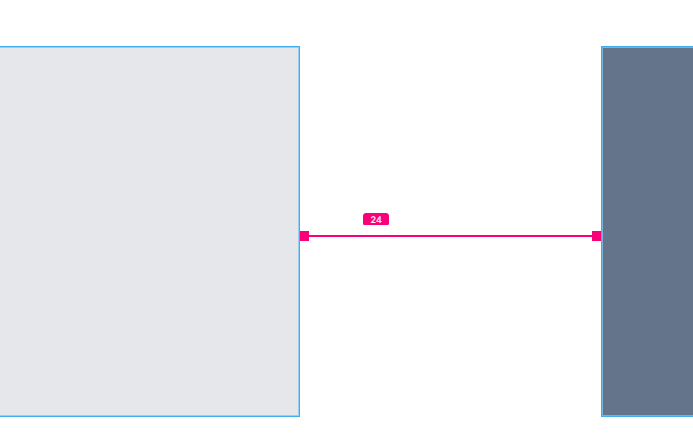

In this prototype, the distance guides are not aligned correctly.
In implementation, this should be center aligned (when horizontal) and middle aligned (when vertical).
In prototype
24
Proposed Position



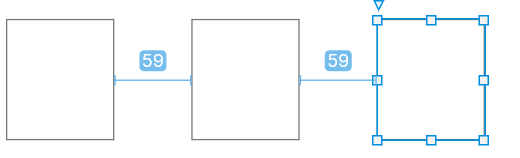
Just like our distance guides are today.
1. Mousedown on the left drag handle
2. Notice the Distance Guides shows
3. Notice the drag handle disappears.

24
1. Drag the drag handle to the right.
2. Notice the space between widgets increases.
3. Drag the handle to the left.
4. Notice the space between widgets decreases.
OnDragDrop should make the Distance Guides disappear
1. Release the drag
2. Notice Distance Guides disappear.
Only the left drag handle is functional in this prototype. All drag handles should be functional.
Prototype instructions


We should show handles for both Horizontal and Vertical equidistant widgets.
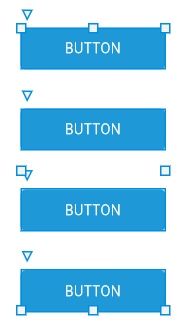
Drag handles should render in the space-between with the same positioning logic like "smart distance guides".
BUTTON
BUTTON
BUTTON
BUTTON
BUTTON
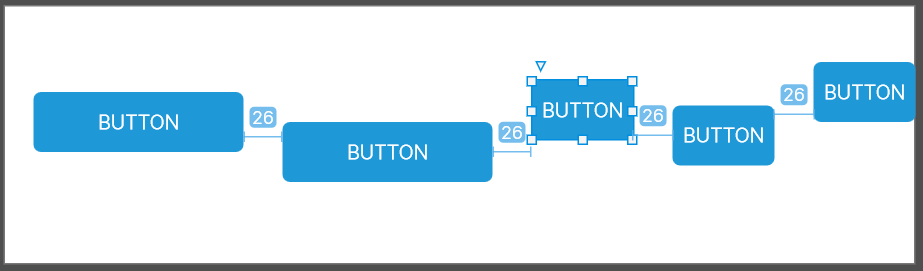
The handles should really only appear in the same logic when distance guides appear. (widgets must be both "equidistant" and in the "line of sight" (intersect on the respective axis)
Smart Distance Guides
- Jira ticket: https://axure.atlassian.net/browse/RP-1864
BUTTON
BUTTON
BUTTON
If these buttons are selected...
I would expect to see Drag Handles when mousing over the selection
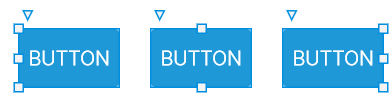
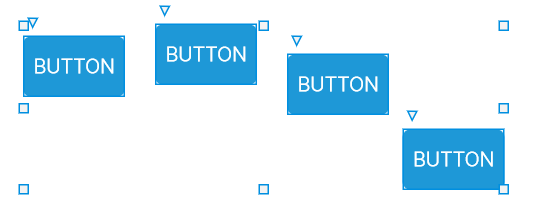
However, I would not expect to see them when these widgets are selected....

Line of sight

Line of sight
BUTTON
...Because they are not all within the "line of sight" of one another (Does not all intersect on the x-axis).
Even though they are horizontally equidistant.
BUTTON
Line of sight
BUTTON

Line of sight
BUTTON

Line of sight
If the user selects multiple widgets then does a Distribute action... The equidistant markers should always appear after.
Widgets are selected
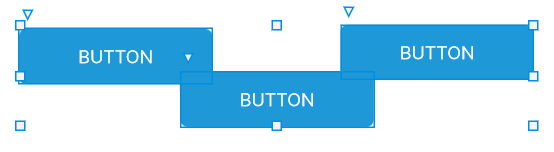
Drag handles would still render when mousingover selection group. (even with negative equidistance)
Clarifications on the prototype
Vertical Equidistant Widgets
Showing drag handles in space-between
Equidistant and intersecting on the x-axis
Distribute should end up always showing equidistant markers
BUTTON
BUTTON
BUTTON
Distribute

OnDragDropped, if the user’s cursor is within the area of the selected widgets then the drag handle should appear (Scenario 1)
If the user selects multiple widgets then does a Distribute action... The equidistant markers should always appear after.

Group
Selection of a Container Widget should show equidistant guides if all children are equidistant

BUTTON
BUTTON
BUTTON
BUTTON
BUTTON
BUTTON

Given a user has a container (group or dynamic panel) with all direct children of the container equidistant....

Dynamic panel
When the user selects the container
Then show the Drag Handles.
Experimental Note: We'll probably also want this to happen in the State Editing Mode (where if the user double clicks to enter the dynamic panel)
....
AND
in All States View when the user selects a state
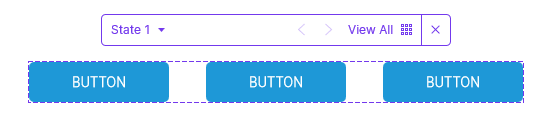
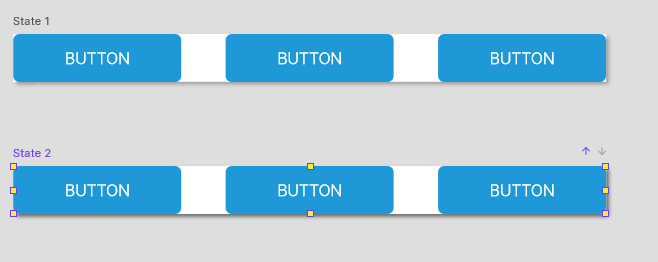

State Editing Mode

State Selected in All States View
